If you already have an SEO plugin on your WordPress site, adding another one can feel risky. Will they fight over your meta tags? Will you end up with duplicate sitemaps? Will your rankings take a hit while things sort themselves out?
The good news: HiRizzi AI SEO is built to handle both the traditional SEO work search engines have always cared about and the newer job of making your site legible to AI systems like ChatGPT, Claude, Gemini, and Perplexity. That means you have two realistic ways to set it up, and the right choice depends on how your site is running today.
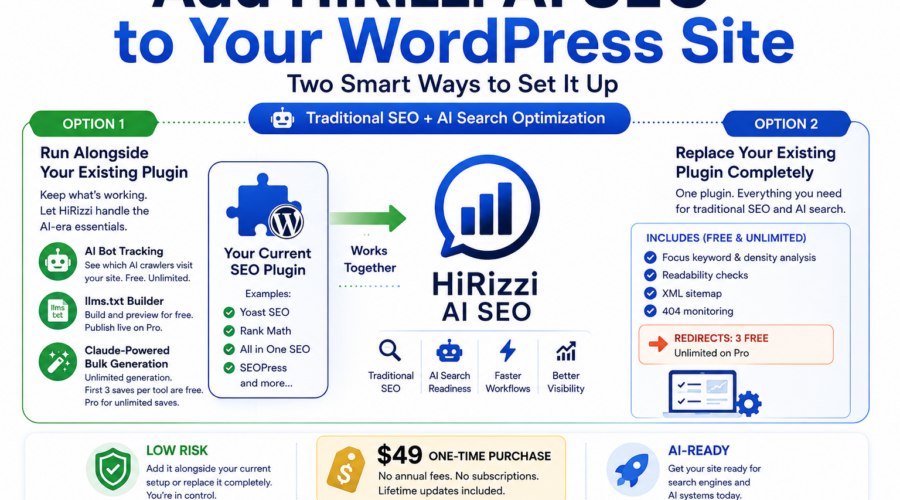
Option 1: Run HiRizzi Alongside Your Existing Plugin
If you’re already using Yoast, Rank Math, or a similar plugin and you don’t want to touch what’s currently working, you don’t have to. HiRizzi is designed to detect other major SEO plugins and step back automatically so it won’t overwrite your existing meta tags or fight for control of the same fields.
In this setup, you keep your current plugin doing what it already does well — traditional on-page SEO, classic sitemaps, and whatever workflow you’re used to — and let HiRizzi handle the parts that are newer and less likely to already exist in your stack:
- AI bot tracking. See which AI crawlers (GPTBot, ClaudeBot, PerplexityBot, and others) are actually visiting your site and which pages they’re requesting. This is fully free, with no limits.
- llms.txt. This is the emerging AI-era equivalent of robots.txt plus a sitemap — a plain-language file that tells AI systems what your site is about and which pages matter most. You can fully build and preview yours on the free version; publishing it live at yoursite.com/llms.txt is a Pro feature.
- Claude-powered bulk generation. Generate SEO titles, meta descriptions, and FAQ content across many pages at once instead of opening each one individually. Generating and reviewing is free and unlimited. Your first 3 saves per tool (SEO metadata, FAQs) go live on the free plan too — beyond that, saving requires Pro.
This is the lower-risk path if your current setup is working and you just want to add AI-search readiness on top of it.
Option 2: Replace Your Existing Plugin Completely
If you’d rather run fewer plugins, HiRizzi has grown into a complete, standalone SEO suite that can take over everything your current plugin does — no traditional SEO functionality left behind.
What you keep, all fully free with no caps:
- Focus keyword and keyword density analysis
- Readability checks
- XML sitemap
- 404 monitoring
Redirects come with a free allowance, not unlimited. You get 3 active redirects on the free version, unlimited on Pro. If you’re migrating away from another SEO plugin, it’s worth checking how many redirects you actually have set up first — sites with real history often have more than 3, and that’s the one place a straight swap might need Pro from day one rather than later.
The bigger picture on cost: most established SEO plugins with AI or advanced features charge an annual subscription. HiRizzi AI SEO is a $49 one-time purchase. Pro unlocks unlimited redirects, unlimited bulk saves, and lets llms.txt and AI crawler rules actually go live — everything above that list works the same whether you’re on free or Pro.
Which One Is Right for You?
Neither path is objectively better — it depends on your site:
- Small site, happy with your current plugin, mainly want AI visibility? Run HiRizzi alongside it. Start with the free AI tools and decide later if the bulk-save limits or live llms.txt publishing are worth upgrading for.
- Tired of paying an annual subscription, want one plugin instead of two? A full replacement is realistic — just count your existing redirects first, since that’s the one spot where a big migration might bump into the free tier’s limit right away.
Either way, you can try it without committing to anything: download the free version of HiRizzi AI SEO and see how it behaves on your actual site before deciding whether Pro makes sense for you.
Still not sure which setup fits your site? Tell us which SEO plugin you’re currently running and roughly how many pages (and existing redirects) you’re working with, and we’ll help you figure out the right starting point.
Leave a Comment